Appearance
Sealed Results
Sealed Results encrypt the Javascript SDK response for improved security. Normally, a call to honeypot.get() would return a plaintext JSON object in the format described here. However, when Sealed Results are enabled, the payload is encrypted.
TIP
Both example payloads below have been truncated for brevity's sake.
json
{
  "org_id": "a7932812-e929-5723-ry90-s56140d2212c",
  "honeypot_name": "honeypot-97ytr8",
  "event_id": "b531b741-9fa4-48f7-ac83-f1040d3f6db3",
  "events": [...],
  "event_name": "Sign Up",
  "event_properties": {...},
  "event_time": "2025-06-06T13:53:00.302Z",
  "ip_address": "123.444.555.678",
  "asn": 7018,
  "latitude": 42.9634,
  "longitude": -85.6681,
  "timezone": "America/Detroit",
  "identity": "xxxxxx@hotmail.com",
  "browser_fingerprint": "ca689967b84aa1aeb3e09d8967ea02cc",
  "handprint_id": "72b0769e-f08e-4bbe-b4cb-fb1b8de1635e",
  "device_id": "72b0769e-f08e-4bbe-b4cb-fb1b8de1635e",
  "session_id": "ea21830d-6629-46dc-bd00-989aca3f2b77",
  "behaviors": {...},
  "geofenced": false,
  ...
}
json
{
  // the entire payload is encrypted in the `sealed` value.
  "sealed": "noXc7WKIBr5ZX+rqdBceWksl2GneobIRLpv4CoEB...=",
  // user privacy settings remain unecrypted to help you honor your users'
  // tracking preferences as early as possible
  "browser_privacy_enabled": false,
  "cookies_enabled": true,
  "cookie_test_passed": true,
  "gpc_enabled": true
}
The primary benefit of encrypting responses is to prevent malicious actors from reading or tampering with the results on the client side. Keep reading to learn how to enable this feature.
Enabling Sealed Payloads
Step 1.
Go to the honeypots page, and click the button to edit the Honeypot 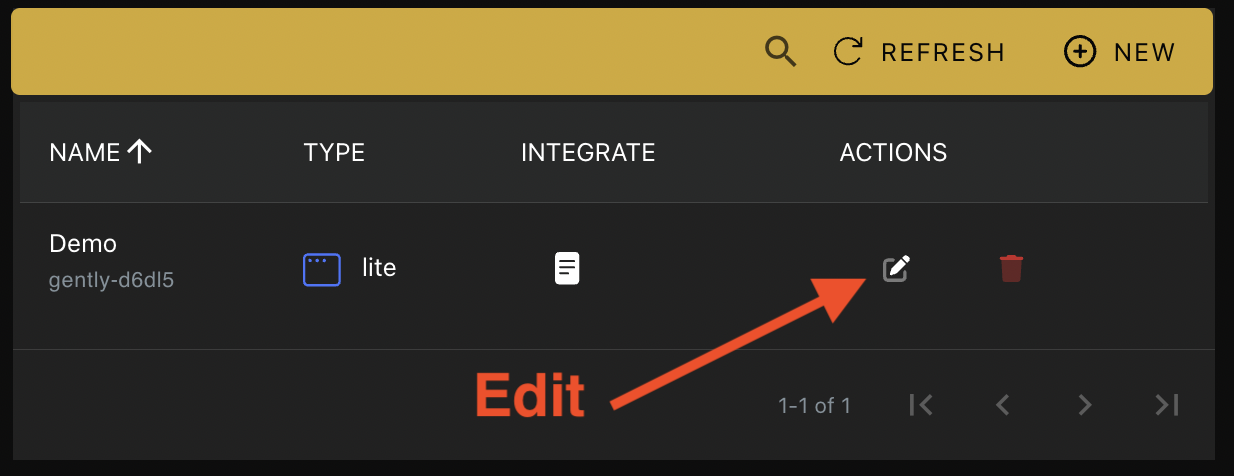
Step 2.
Under the Summary tab, toggle the Disabled status for sealed payloads by clicking the button shown below. 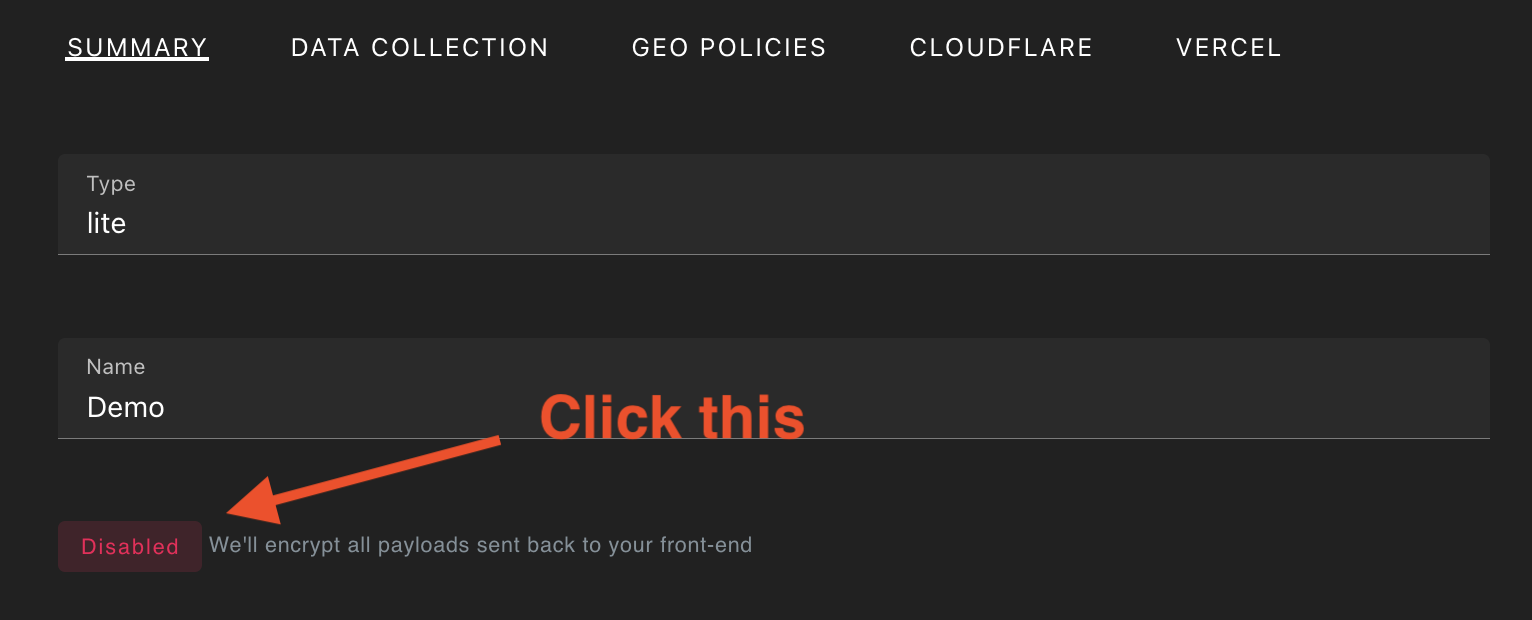
Step 3.
You will see an encryption key appear. Click the key to copy the value. 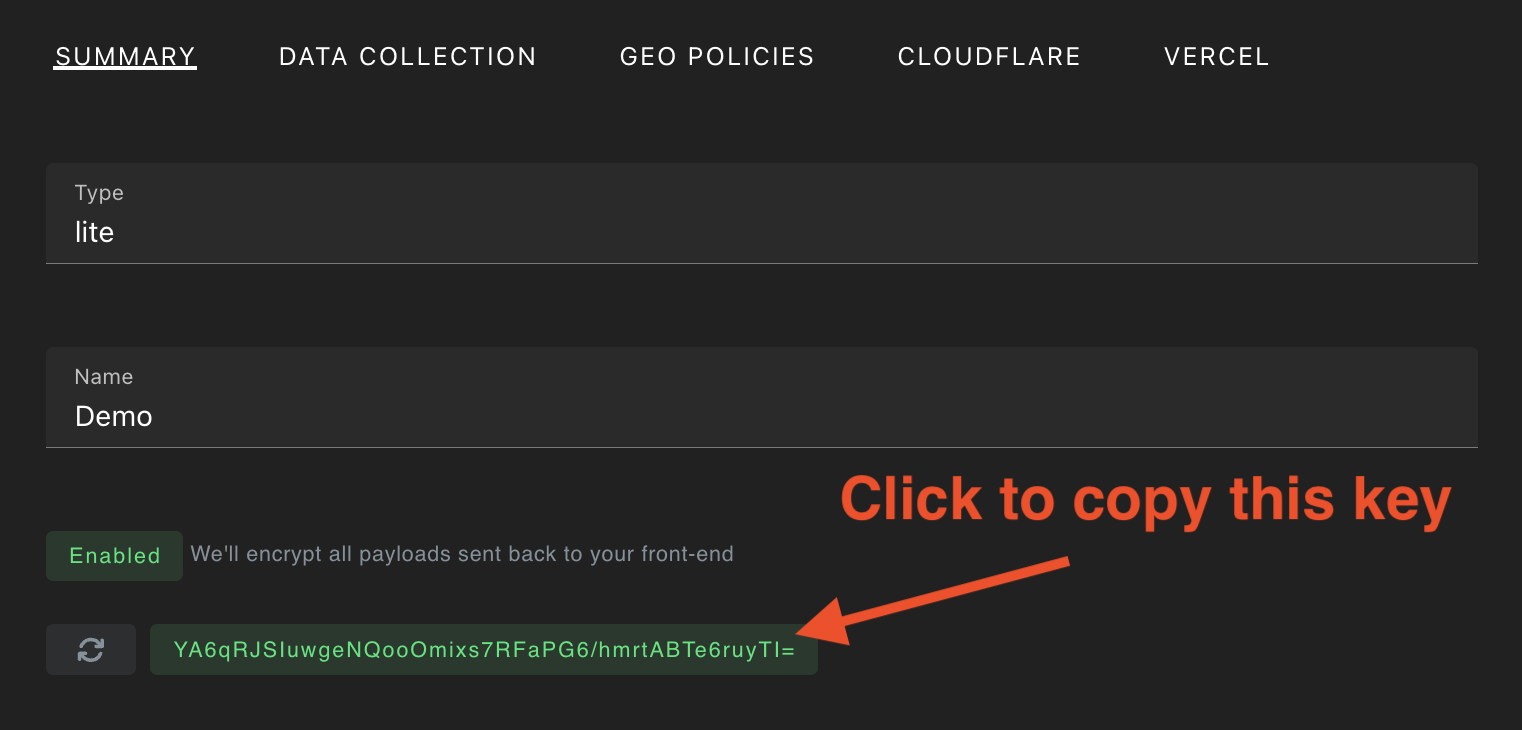
Step 4.
From the Data Collection tab, confirm the fields that you want included in the encrypted payload. 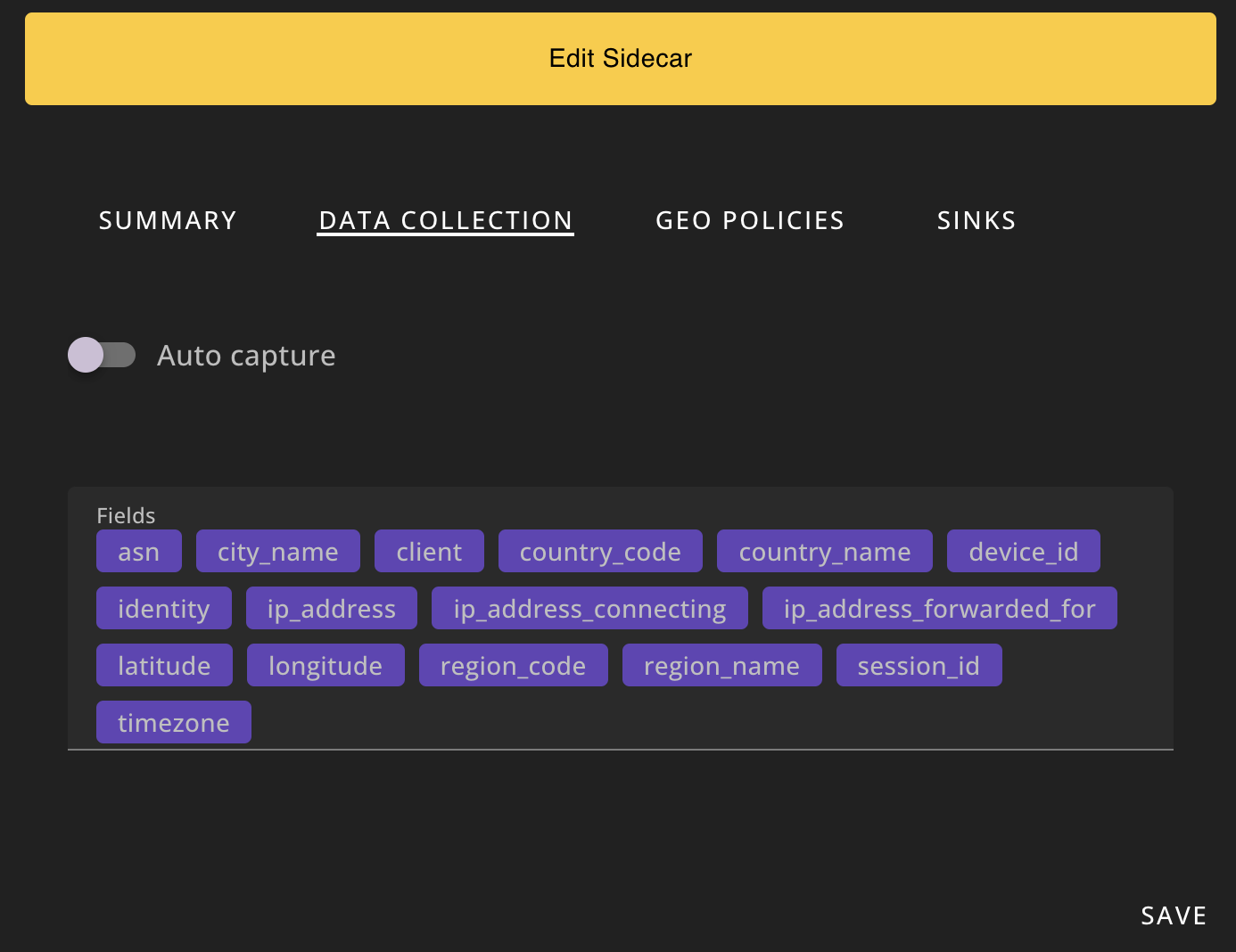
If you'd like to include all of the available fields in the payload, set the Fields to empty. 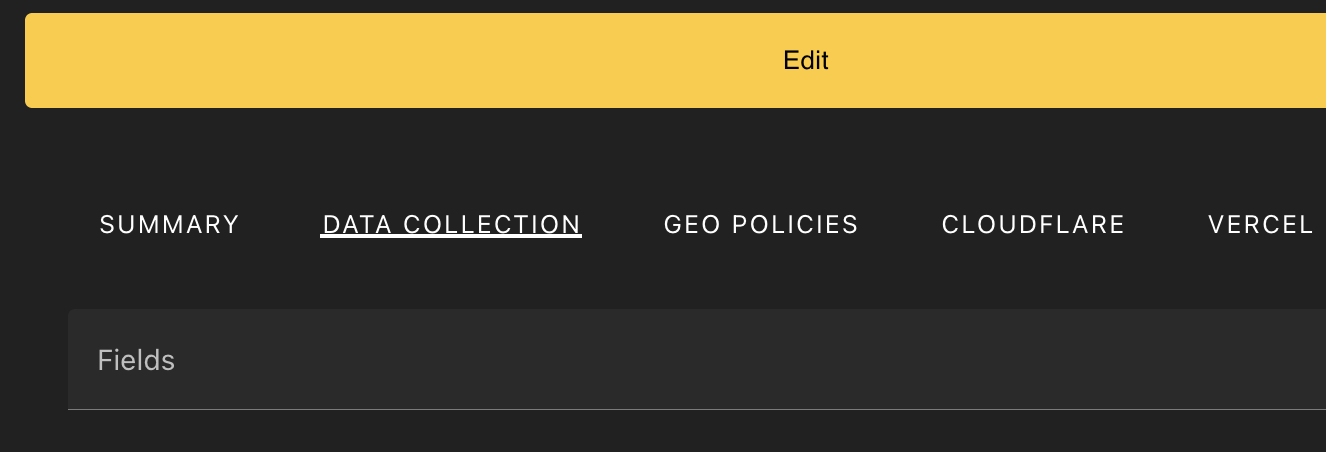
Step 5.
Then, click Save. 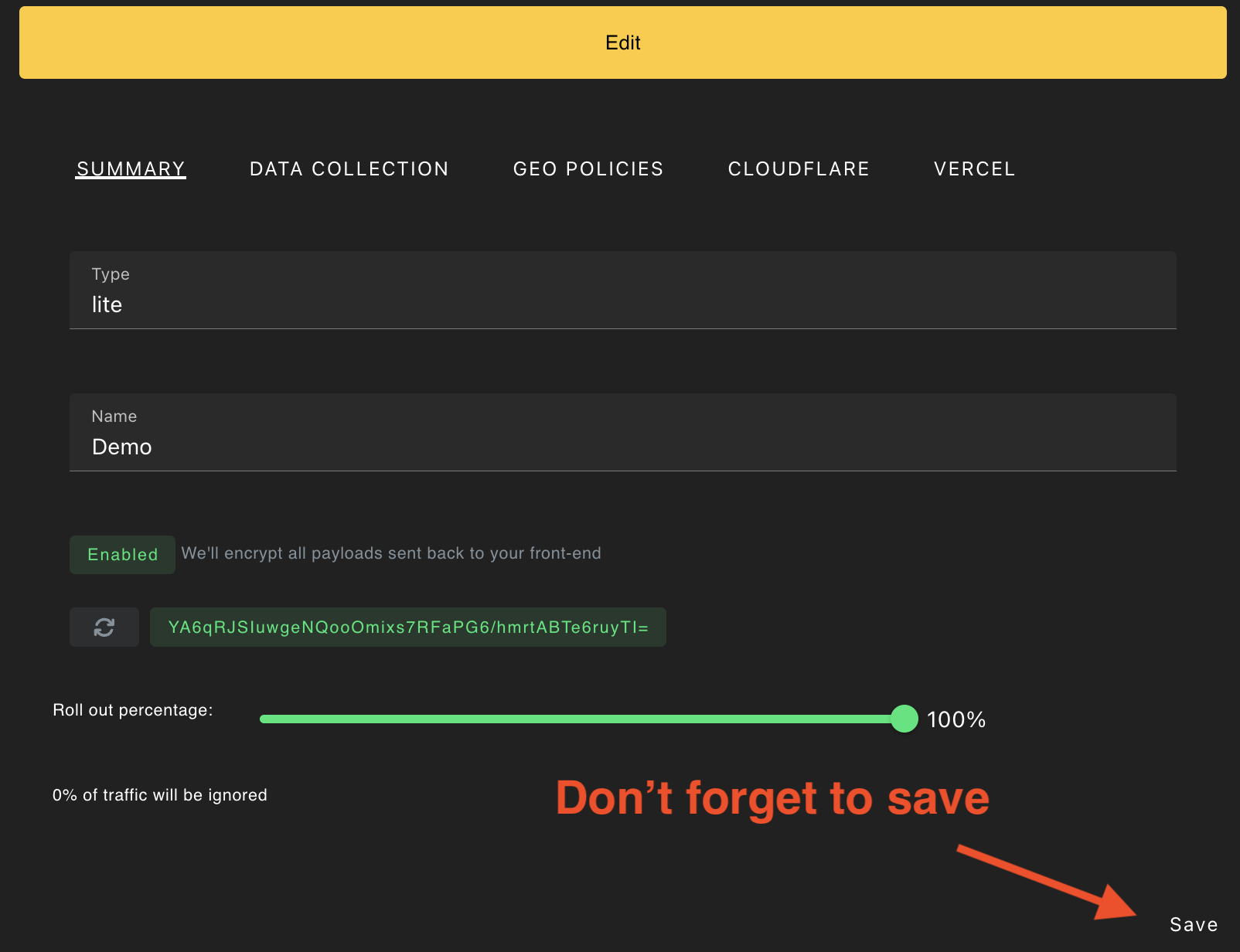
Step 6.
Now, when you call honeypot.get() from the Javascript SDK, the results will be encrypted in the sealed key in the payload.
WARNING
The only unencrypted data that will still show up in the payload are a subset of privacy settings (cookies_enabled, cookie_test_passed, gpc_enabled), which remain unencrypted to customers can honor their users' privacy preferences as early as possible.
json
{
  "sealed": "noXc7WKIBr5ZX+rqdBceWksl2GneobIRLpv4CoEB5BZU1sqHiDzlh4...",
  "browser_privacy_enabled": false,
  "cookies_enabled": true,
  "cookie_test_passed": true,
  "gpc_enabled": true
}
Decrypting Sealed Payloads
An example for how decrypt the payload is shown below.
Python
python
import base64
import gzip
import json
from cryptography.hazmat.primitives.ciphers import Cipher, algorithms, modes
from cryptography.hazmat.backends import default_backend

def unseal_payload(sealed_base64: str, base64_key: str) -> dict:
    if not sealed_base64 or not isinstance(sealed_base64, str):
        raise ValueError('Invalid sealedBase64 input')
    if not base64_key or not isinstance(base64_key, str):
        raise ValueError('Invalid base64Key input')

    key = base64.b64decode(base64_key)

    # Constants for crypto
    NONCE_LENGTH = 12  # AES-GCM nonce size
    SEALED_HEADER = bytes([0x9e, 0x85, 0xdc, 0xed])  # Custom header for validation
    TAG_LENGTH = 16  # AES-GCM tag size (typically 16 bytes)

    try:
        sealed_result = base64.b64decode(sealed_base64)
    except Exception as e:
        raise ValueError('Invalid base64 string') from e

    # Verify the header
    if sealed_result[:len(SEALED_HEADER)] != SEALED_HEADER:
        raise ValueError('Invalid header')

    # Extract nonce, encrypted data, and authentication tag
    nonce = sealed_result[len(SEALED_HEADER):len(SEALED_HEADER) + NONCE_LENGTH]
    encrypted_data_with_tag = sealed_result[len(SEALED_HEADER) + NONCE_LENGTH:]
    encrypted_data = encrypted_data_with_tag[:-TAG_LENGTH]
    tag = encrypted_data_with_tag[-TAG_LENGTH:]

    # Decrypt the data using AES-GCM
    try:
        cipher = Cipher(
            algorithms.AES(key),
            modes.GCM(nonce, tag),
            backend=default_backend()
        )
        decryptor = cipher.decryptor()
        decrypted_data = decryptor.update(encrypted_data) + decryptor.finalize()

        # Decompress the decrypted payload
        decompressed_payload = gzip.decompress(decrypted_data)

        # Convert the decompressed payload back to a string and parse as JSON
        decoded_payload = decompressed_payload.decode('utf-8')
        return json.loads(decoded_payload)
    except Exception as e:
        raise ValueError(f'Decryption failed: {e}') from e
python
# pass this from the front-end
payload = {
    "sealed": "noXc7WKIBr5ZX+rqdBceWksl2Gne...."
}

# Replace with your seal key
seal_key = "YOUR_SEAL_KEY"

# Decrypt the payload
decrypted_payload = unseal_payload(payload.get("sealed"), seal_key)
print(decrypted_payload)