Appearance
Device Registration for Banking & Agent Networks
Honeypot provides built-in device registration — you don't need to build a device registry. Every request answers two questions:
- Do we know this device? — Is it registered to a user?
- Do we trust this device? — Is it registered AND free of risk signals?
The Core Flow
1. Device Gets a Persistent ID
When your app launches, Honeypot generates a unique device ID that:
- Persists across app reinstalls (stored in Android Keystore)
- Cannot be spoofed or transferred to another device
- Identifies the physical device, not the app installation
kotlin
val deviceId = Honeypot.deviceId
// "834d2f18-853b-4e60-92b3-4e1226306d70"
2. Device Gets Registered to a User
During onboarding, you register the device to a specific user (agent, customer, staff):
kotlin
Honeypot.registerDevice(userId = "agent-12345") {
    set("role", "bank_agent")
    set("branch", "lagos-central")
}
Honeypot now knows: this device belongs to agent-12345.
3. Every Request Returns Registration + Trust Status
When the user performs any action, Honeypot tells you:
kotlin
val result = Honeypot.track("P2P Transfer") { ... }

result.onSuccess { response ->
    response.device.isRegistered    // true - we know this device
    response.device.registeredTo    // "agent-12345" - who it belongs to
    response.device.isTrusted       // true - registered AND no risk flags

    response.riskScore              // 0.1 - low risk
    response.tags                   // [] - no risk signals
}
4. You Make Authorization Decisions
Your app decides what to allow based on device status + risk signals:
| Device Status | Risk Signals | Action |
|---|---|---|
| Not registered | — | Block, require registration |
| Registered, trusted | None | Allow |
| Registered, trusted | new_device | Allow with limits |
| Registered, trusted | vpn | Challenge (disable VPN) |
| Registered, not trusted | multi_user | Block, security alert |
| Registered, not trusted | rooted | Block |
Architecture
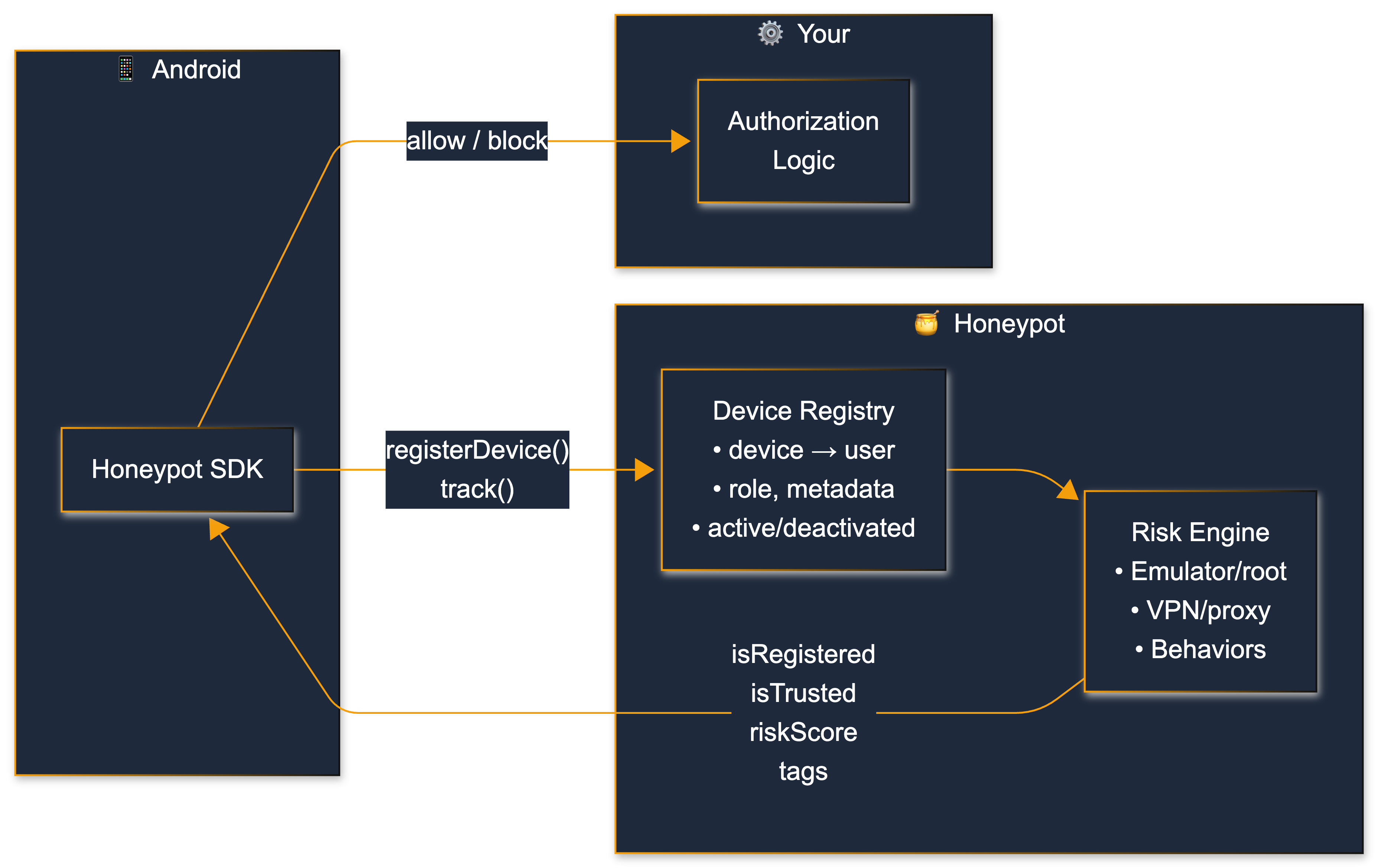
What Each Layer Does
| Layer | Responsibility |
|---|---|
| Android SDK | Generates persistent device ID, sends events |
| Device Registry | Maps device_id → user_id, tracks active/deactivated status |
| Risk Engine | Detects emulators, root, VPN, behavioral anomalies |
| Your Backend | Makes authorization decisions based on device + risk signals |
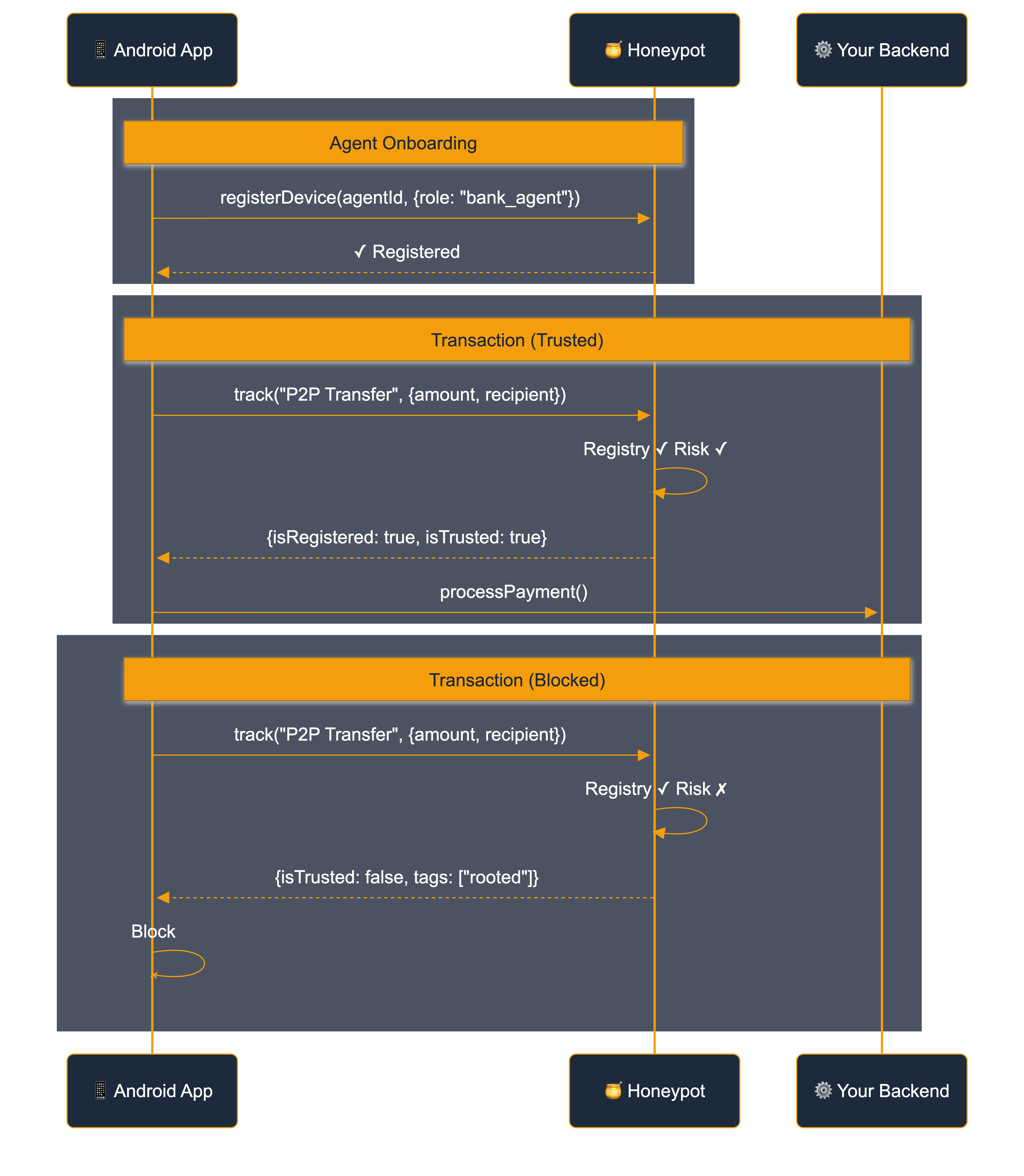
Integration Flow
Use Cases
| Scenario | What You Check |
|---|---|
| Agent onboarding | Risk signals before registering device |
| Customer onboarding | Phone/email validation + device registration |
| Agent starts shift | Device registered to this agent? |
| Customer transaction | Device registered? Trusted? Velocity limits? |
| Phone lost/stolen | Deactivate device immediately |
| Agent gets new phone | Register new device, deactivate old |
Next Steps
- Android SDK — Full SDK reference with code examples
- Event Payload — All response fields
- Behaviors — Behavioral analytics configuration